Virtual Audio Streaming - a virtual sound card tool
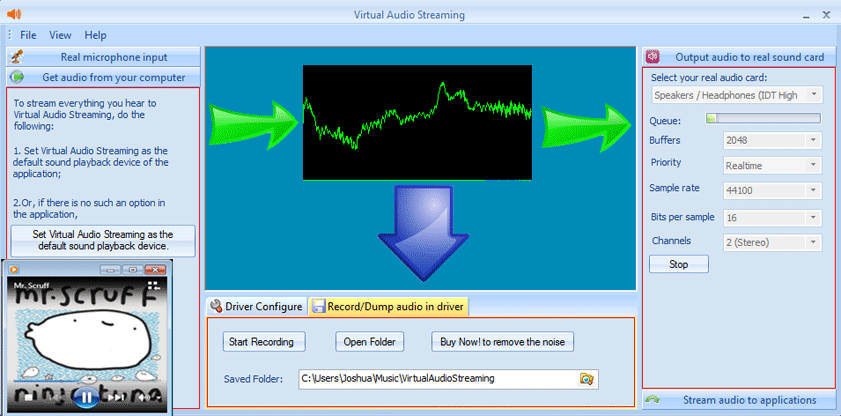

Virtual Audio Streaming simulates a sound card on your windows. You can use it as an enhancement of your physical sound card. Virtual Audio Streaming has the following features:
What you hear is what you get! Virtual Audio Streaming also fixes the 'no stereo mix' problem of Vista/Windows 7/Windows 8/Windows 10/Windows 11/Windows Server/Remote desktop.
Virtual Audio Streaming can record ALL sounds that played from your computer. It is done by our kernel-mode virtual audio card driver to ensure the
recording quality. Possible scenarios:
- Record Skype voice, with people's and your voice mixed together or separated;
- Record online streaming music/audio, chatting/meeting voice, game sound, Internet radio, etc.;
- Record microphone voice;
- Extract audio from video;
Besides manually controlling the recording duration time, you also have the option to record sounds per audio stream. With this option,
Virtual Audio Streaming can recognize & split sounds to different wav files per audio stream automatically.
 Unique!
Please also be noted that our virtual sound card driver has already been digitally signed with Microsoft, so it supports for both 32 bits & 64 bits of Vista/Windows 7/Windows 8/Windows 10/Windows 11.
Normally, online streaming audio sites (e.g., Justin.tv) or voice chat software (e.g., Skype) can only read sounds from your physical microphone. Virtual Audio Streaming removes this limitation. With its Virtual Microphone, you can easily stream local music files, physical microphone, or any sounds you hear from your computer. For example, you can open a webpage, listen to a song online, and then broadcast it on Justin.tv at the same time.
Also, as a loopback virtual sound card, Virtual Audio Streaming can create a virtual audio cable/channel between two audio applications. For example, you can pipe the sound of RealPlayer into a MP3 encoder without any quality loss.
Virtual Audio Streaming automatically mix all sounds it receives. For example, you can use this feature to add microphone voice to audio files or live Internet music. Then, the mixed sounds can be easily recorded or broadcasted.
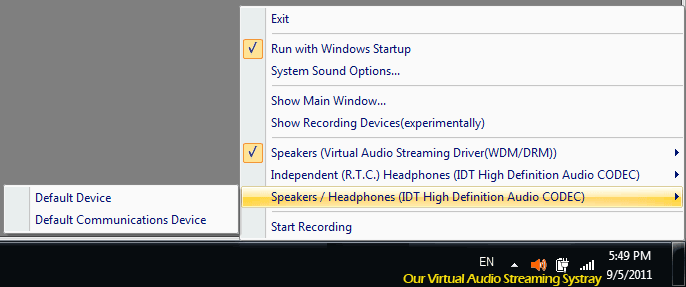
Free download Virtual Audio Streaming now!



System Requirements:
- Windows 2000 / XP / Vista / Windows 7 /Windows Server / Windows 8 /Windows 10 /Windows 11 (32bit/64bit Windows)
- Version 4.2 (Updated on 3/6/2023) version history
- 3.23 MB
Verified by Microsoft...

 Vista/Windows7,8,10 64bits